
Build a store-curated product page where tagged "creator" accounts publish named Swym lists as scrollable carousels — no custom coding required after initial setup.
Wishlist Curation Page
A dedicated page that renders one or more curated Swym lists as scrollable product carousels. A tagged "curation creator" account builds the lists normally across the store, then copies the list IDs into the section settings — no code changes needed to publish new curations.
What you'll build: A Shopify page with one carousel per curated Swym list, each titled and populated from a named list built by a designated curator account. Shoppers browse products, curators manage lists from the storefront, and merchants publish them by pasting list IDs into a section setting — no redeployment required.
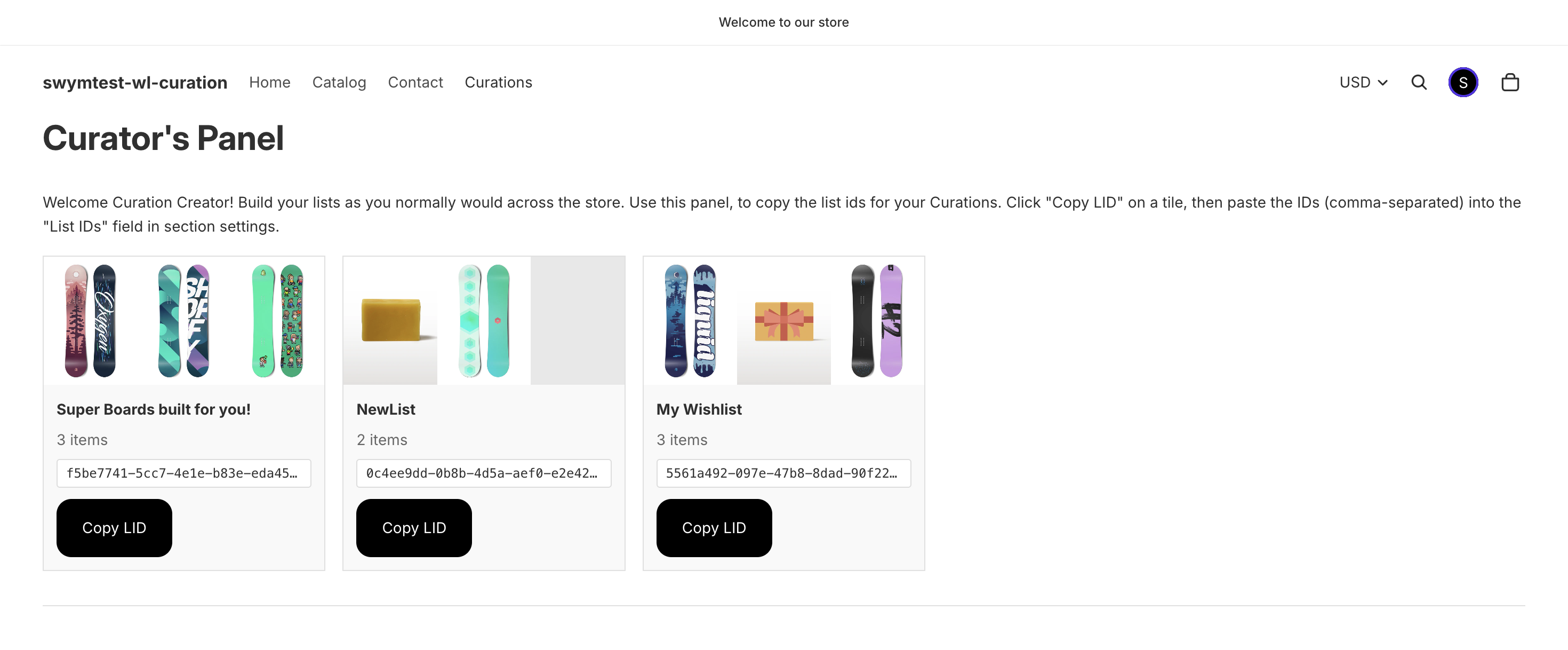
Curator's Panel - visible to user with the configured curation creator tag
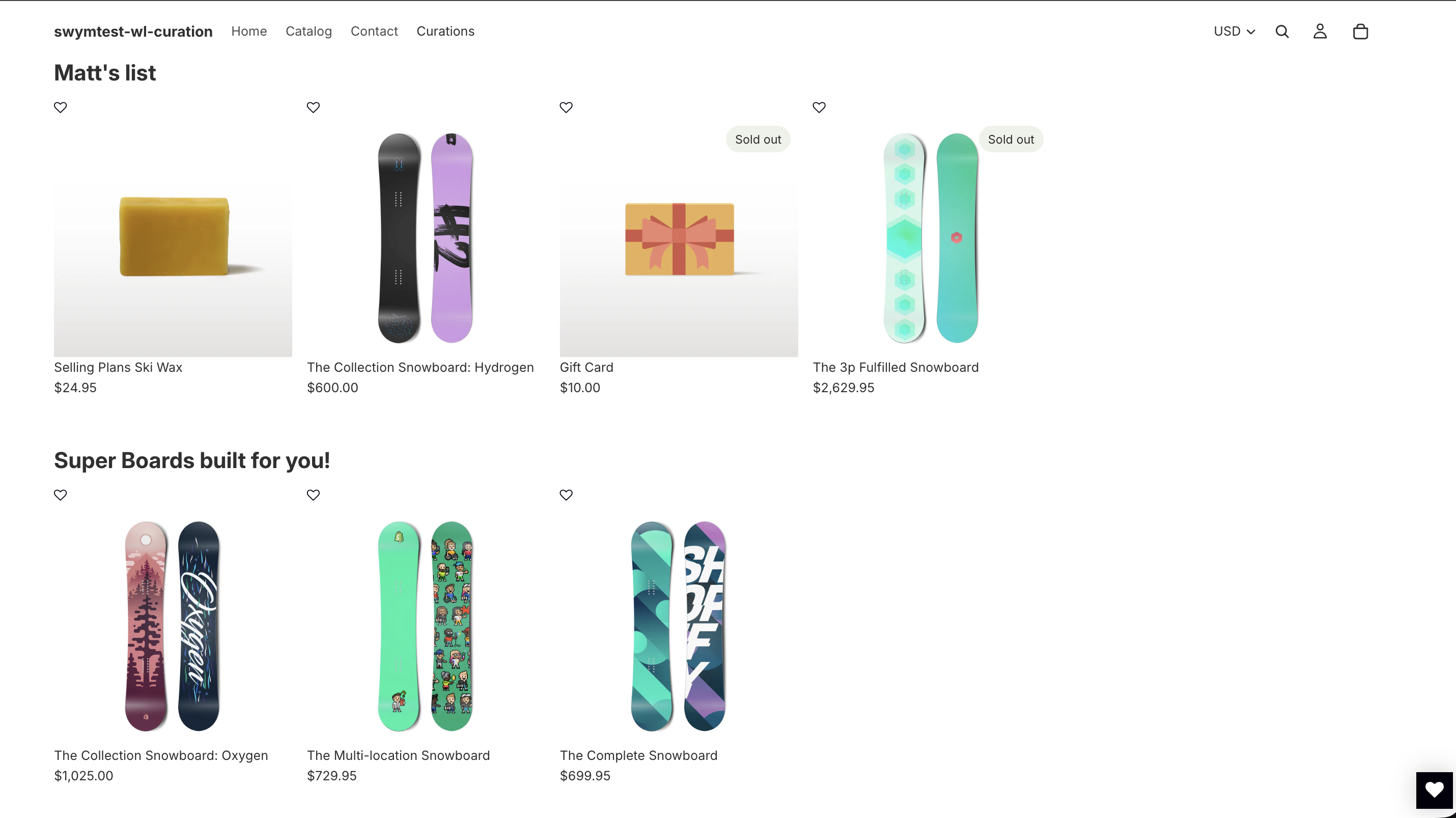
Curated Lists View
Setup
Step 1: Complete the prerequisites
Before writing any code, confirm all of the following are in place:
- The Swym Wishlist Plus app is installed and active on your Shopify store, and its embed snippet is present in your theme layout
- Your theme uses OS 2.0 JSON templates (
templates/page.*.json). Vintage Liquid-only themes require adaptation - At least one Shopify customer account exists that you can tag as
curation-creator— this account will operate the Curator Panel
Note: The search endpoint and product card snippet created in Steps 3 and 4 are new files you will add. They do not need to exist beforehand.
Step 2: Add the section file
In your theme code editor (Online Store > Themes > Edit code), create sections/swym-curation.liquid:
{% comment %} Swym Curation Page — Multiple curated lists, one product grid per LID block {% endcomment %}
<style>
.swym-curation-list {
  margin-bottom: 3.5rem;
}
.swym-curation-loading {
  padding: 2rem 0;
}
.swym-curation-empty {
  display: flex;
  flex-direction: column;
  align-items: center;
  padding: 3rem 0;
}

#swym-creator-panel {
  margin-bottom: 3rem;
  padding-bottom: 2rem;
  border-bottom: 1px solid #e0e0e0;
}
#swym-creator-lists {
  display: grid;
  grid-template-columns: repeat(auto-fill, minmax(220px, 1fr));
  gap: 1rem;
  margin-top: 1rem;
}
.swym-creator-list-tile {
  border: 1px solid #e0e0e0;
  background: #f9f9f9;
  overflow: hidden;
}
.swym-creator-tile-images {
  display: grid;
  grid-template-columns: repeat(3, 1fr);
  height: 120px;
}
.swym-creator-tile-img {
  width: 100%;
  height: 100%;
  object-fit: cover;
  display: block;
}
.swym-creator-tile-img--empty {
  background: #e8e8e8;
}
.swym-creator-tile-body {
  padding: 0.75rem;
  display: flex;
  flex-direction: column;
  gap: 0.4rem;
}
.swym-creator-list-name {
  font-weight: 600;
  margin: 0;
}
.swym-creator-list-count {
  color: #666;
  font-size: 0.875rem;
  margin: 0;
}
.swym-creator-lid {
  font-family: monospace;
  font-size: 0.75rem;
  background: #fff;
  border: 1px solid #ddd;
  padding: 3px 8px;
  border-radius: 3px;
  overflow: hidden;
  text-overflow: ellipsis;
  white-space: nowrap;
  display: block;
}
.swym-copy-lid-btn {
  white-space: nowrap;
  align-self: flex-start;
  margin-top: 0.25rem;
}

.swym-carousel .product-grid {
  display: flex !important;
  flex-wrap: nowrap !important;
  overflow-x: auto;
  scroll-behavior: smooth;
  scroll-snap-type: x mandatory;
  min-width: 0;
  gap: 1rem;
  cursor: grab;
}
.swym-carousel .product-grid:active {
  cursor: grabbing;
}
.swym-carousel .product-grid::-webkit-scrollbar {
  display: none;
}
.swym-carousel .product-grid {
  -ms-overflow-style: none;
  scrollbar-width: none;
}
.swym-carousel .product-grid > * {
  flex: 0 0 var(--carousel-item-width, 260px);
  max-width: var(--carousel-item-width, 260px);
  scroll-snap-align: start;
}
.swym-carousel .product-grid[data-product-card-size="small"]       { --carousel-item-width: 180px; }
.swym-carousel .product-grid[data-product-card-size="large"]       { --carousel-item-width: 365px; }
.swym-carousel .product-grid[data-product-card-size="extra-large"] { --carousel-item-width: 530px; }
@media screen and (max-width: 749px) {
  .swym-carousel .product-grid > * {
    flex: 0 0 calc(50% - 0.5rem);
    max-width: calc(50% - 0.5rem);
  }
  .swym-carousel .product-grid-mobile--large > * {
    flex: 0 0 100%;
    max-width: 100%;
  }
}
</style>

<script>
  window.swymCurationSearchUrl = "{{ shop.url | append: routes.search_url }}";
  window.swymCuratorTag = {{ section.settings.curator_tag | default: 'curation-creator' | json }};
</script>

<div id="swym-curation-page" class="section section--page-width" style="min-height: 60vh;">

  {% assign curator_tag = section.settings.curator_tag | default: 'curation-creator' %}
  {% if customer and customer.tags contains curator_tag %}
  <div id="swym-creator-panel">
    <h3>Curator's Panel</h3>
    <p class="small" style="margin-top: 0.5rem; margin-bottom: 0;">
      {{ 'content.curations.curator_info' | t }}
    </p>
    <div id="swym-creator-lists-loading" aria-live="polite">{{ 'content.curations.curator_loading' | t }}</div>
    <div id="swym-creator-lists" role="list" aria-label="Your Swym lists"></div>
  </div>
  {% endif %}

  {% assign lids_raw = section.settings.lids %}
  {% if lids_raw != blank %}
    {% assign lids = lids_raw | split: ',' %}
    {% for lid_raw in lids %}
      {% assign lid = lid_raw | strip %}
      {% if lid != blank %}
        <section class="swym-curation-list" data-lid="{{ lid }}">
          <h4 style="margin-bottom: 1rem;"></h4>
          <div class="swym-curation-loading" aria-live="polite">{{ 'content.curations.loading' | t }}</div>
          <div class="swym-carousel">
            <ul
              class="product-grid product-grid--{{ section.id }} product-grid--grid{% if section.settings.mobile_product_card_size == 'large' %} product-grid-mobile--large{% endif %}"
              role="list"
              aria-busy="true"
              data-product-card-size="{{ section.settings.product_card_size }}"
              style="--mobile-columns: {% if section.settings.mobile_product_card_size == 'large' %}1{% else %}2{% endif %}; display: none;"
            ></ul>
          </div>
          <div class="swym-curation-empty" style="display:none;">
            <h4>{{ 'content.curations.empty_heading' | t }}</h4>
            {% if section.settings.empty_browse_url %}
              <a href="{{ section.settings.empty_browse_url }}">{{ 'content.curations.empty_browse' | t }}</a>
            {% endif %}
          </div>
        </section>
      {% endif %}
    {% endfor %}
  {% else %}
    <div id="swym-wishlist-empty" style="display: flex; flex-direction: column; align-items: center; margin: 100px auto 100px;">
      <h3>{{ 'content.curations.empty_heading' | t }}</h3>
      <h4>{{ 'content.curations.empty_subheading' | t }}</h4>
      <a href="{{ section.settings.empty_browse_url | default: '/collections/all' }}">{{ 'content.curations.empty_browse' | t }}</a>
    </div>
  {% endif %}

</div>

{% liquid
  case section.settings.product_card_size
    when 'small'
      assign product_card_size = '180px'
    when 'large'
      assign product_card_size = '365px'
    when 'extra-large'
      assign product_card_size = '530px'
    else
      assign product_card_size = '260px'
  endcase
%}

{% render 'product-badges-styles' %}
{% render 'theme-styles-variables' %}
{% style %}
  @media screen and (min-width: 750px) {
    .product-grid--{{ section.id }}:is(.product-grid--grid) {
      --product-grid-columns-desktop: repeat(auto-fill, minmax({{ product_card_size }}, 1fr));
    }
  }
{% endstyle %}

<script src="{{ 'swym-curation.js' | asset_url }}" defer></script>

{% schema %}
{
  "name": "Swym - Curation Lists",
  "limit": 1,
  "settings": [
    {
      "type": "text",
      "id": "lids",
      "label": "List IDs (LIDs)",
      "info": "Comma-separated Swym list IDs to display. Log in as the curator account on this page and use the 'Copy LID' button to get each ID."
    },
    {
      "type": "url",
      "id": "empty_browse_url",
      "label": "Empty state browse link"
    },
    {
      "type": "select",
      "id": "product_card_size",
      "label": "Product card size",
      "options": [
        { "value": "small", "label": "Small" },
        { "value": "medium", "label": "Medium" },
        { "value": "large", "label": "Large" },
        { "value": "extra-large", "label": "Extra large" }
      ],
      "default": "medium"
    },
    {
      "type": "select",
      "id": "mobile_product_card_size",
      "label": "Mobile product card size",
      "options": [
        { "value": "standard", "label": "Standard (2 columns)" },
        { "value": "large", "label": "Large (1 column)" }
      ],
      "default": "standard"
    },
    {
      "type": "text",
      "id": "curator_tag",
      "label": "Curator customer tag",
      "default": "curation-creator",
      "info": "Shopify customer tag that unlocks the Curator Panel and hides the wishlist button on curation cards. Must match exactly (case-sensitive)."
    }
  ]
}
{% endschema %}
Note: The
<script>block at the top of this section setswindow.swymCurationSearchUrlto your store's search route. The JavaScript in Step 3 reads this global to build the card-fetch URL — do not remove it.
Step 3: Add the JavaScript asset
Create assets/swym-curation.js:
(function () {
'use strict';
function initCurationPage(swat) {
var listEls = document.querySelectorAll('.swym-curation-list[data-lid]');
var total = listEls.length;
var rendered = 0;
function onListRendered() {
rendered++;
if (rendered === total) {
swat.initializeActionButtons('#swym-curation-page');
}
}
listEls.forEach(function (section) {
var lid = section.dataset.lid;
if (!lid) return;
var loadingEl = section.querySelector('.swym-curation-loading');
var grid = section.querySelector('ul.product-grid');
var emptyEl = section.querySelector('.swym-curation-empty');
swat.fetchListDetails({ lid: lid }, function (res) {
if (loadingEl) loadingEl.style.display = 'none';
var list = res && res.list ? res.list : null;
var products = list ? (list.listcontents || []) : [];
var titleEl = section.querySelector('h4');
if (titleEl) titleEl.textContent = (list && list.lname) ? list.lname : lid;
if (!products.length) {
if (emptyEl) emptyEl.style.display = 'flex';
onListRendered();
return;
}
renderProducts(products, grid, emptyEl, lid, onListRendered);
}, function (err) {
console.error('[Swym Curation] fetchListDetails failed for LID ' + lid, err);
if (loadingEl) loadingEl.style.display = 'none';
if (emptyEl) emptyEl.style.display = 'flex';
onListRendered();
});
});
var creatorPanel = document.getElementById('swym-creator-panel');
if (creatorPanel) {
initCreatorPanel(swat);
}
}
// _gens persists for the script's lifetime. In a SPA theme where the page re-renders
// without a full reload, _gens[lid] carries over and the first render of the next visit
// is silently discarded as stale. Acceptable for standard Shopify navigation.
var _gens = {};
function renderProducts(products, container, emptyEl, lid, onDone) {
_gens[lid] = (_gens[lid] || 0) + 1;
var gen = _gens[lid];
container.setAttribute('aria-busy', 'true');
container.style.display = 'none';
container.innerHTML = '';
if (!products || !products.length) {
if (emptyEl) emptyEl.style.display = 'flex';
container.setAttribute('aria-busy', 'false');
return;
}
if (emptyEl) emptyEl.style.display = 'none';
var variantIds = products.map(function (p) { return p.epi; }).join('-');
var productIds = Array.from(
new Set(products.map(function (p) { return p.empi; }))
).map(function (id) { return 'id:' + id; }).join(' OR ');
var base = window.swymCurationSearchUrl || window.wishListRouteSearchUrl || '/search';
// Parameters are parsed by name in search.wishlist.liquid — keep key names in sync if changed.
var url = base + '?type=product'
+ '&variant_ids=' + variantIds
+ '&lid=' + lid
+ '&q=' + encodeURIComponent(productIds)
+ '&view=wishlist'
+ '&curator_tag=' + encodeURIComponent(window.swymCuratorTag || 'curation-creator');
fetch(url)
.then(function (res) { return res.json(); })
.then(function (data) {
if (_gens[lid] !== gen) return;
var items = data.items || [];
// Shopify search returns results in relevance order, not list order.
// Build a map from variant id to html, then insert in the curator's original order.
var htmlByVariantId = {};
items.forEach(function (item) {
if (item && item.html) htmlByVariantId[String(item.id)] = item.html;
});
products.forEach(function (p) {
var html = htmlByVariantId[String(p.epi)];
if (!html) return;
var wrap = document.createElement('div');
wrap.innerHTML = html;
while (wrap.firstChild) container.appendChild(wrap.firstChild);
});
container.style.display = '';
container.setAttribute('aria-busy', 'false');
if (onDone) onDone();
})
.catch(function () {
if (_gens[lid] !== gen) return;
container.style.display = '';
container.setAttribute('aria-busy', 'false');
if (onDone) onDone();
});
}
function initCreatorPanel(swat) {
var loadingEl = document.getElementById('swym-creator-lists-loading');
var listsEl = document.getElementById('swym-creator-lists');
var _publicised = new Set();
swat.fetchLists({
callbackFn: function (lists) {
if (loadingEl) loadingEl.style.display = 'none';
if (!lists || !lists.length) {
if (listsEl) listsEl.innerHTML = '<p>No lists found in your account.</p>';
return;
}
lists.forEach(function (list) {
var contents = list.listcontents || [];
var count = contents.length;
var imgHtml = '';
for (var j = 0; j < 3; j++) {
var p = contents[j];
if (p && p.iu) {
imgHtml += '<img class="swym-creator-tile-img" src="' + esc(p.iu) + '" alt="" loading="lazy">';
} else {
imgHtml += '<div class="swym-creator-tile-img swym-creator-tile-img--empty"></div>';
}
}
var tile = document.createElement('div');
tile.className = 'swym-creator-list-tile';
tile.setAttribute('role', 'listitem');
tile.innerHTML =
'<div class="swym-creator-tile-images">' + imgHtml + '</div>' +
'<div class="swym-creator-tile-body">' +
'<p class="swym-creator-list-name">' + esc(list.lname || 'Untitled') + '</p>' +
'<p class="swym-creator-list-count">' + count + ' item' + (count !== 1 ? 's' : '') + '</p>' +
'<code class="swym-creator-lid" title="' + esc(list.lid) + '">' + esc(list.lid) + '</code>' +
'<button class="swym-copy-lid-btn button" type="button" data-lid="' + esc(list.lid) + '">Copy LID</button>' +
'</div>';
if (listsEl) listsEl.appendChild(tile);
});
if (listsEl) {
listsEl.addEventListener('click', function (e) {
var btn = e.target.closest('.swym-copy-lid-btn');
if (!btn) return;
var lid = btn.dataset.lid;
if (_publicised.has(lid)) {
copyText(lid, btn);
return;
}
btn.disabled = true;
swat.markListPublic(lid, function () {
_publicised.add(lid);
btn.disabled = false;
copyText(lid, btn);
}, function () {
btn.disabled = false;
copyText(lid, btn);
});
});
}
},
errorFn: function () {
if (loadingEl) loadingEl.style.display = 'none';
if (listsEl) listsEl.innerHTML = '<p>Could not load your lists.</p>';
}
});
}
function copyText(text, btn) {
var orig = btn ? btn.textContent : '';
var done = function () {
if (!btn) return;
btn.textContent = 'Copied!';
setTimeout(function () { btn.textContent = orig; }, 1500);
};
if (navigator.clipboard && navigator.clipboard.writeText) {
navigator.clipboard.writeText(text).then(done).catch(function () { fallback(text); done(); });
} else {
fallback(text);
done();
}
}
function fallback(text) {
var ta = document.createElement('textarea');
ta.value = text;
ta.style.cssText = 'position:fixed;opacity:0;pointer-events:none;';
document.body.appendChild(ta);
ta.select();
try { document.execCommand('copy'); } catch (e) {}
document.body.removeChild(ta);
}
function esc(str) {
return String(str)
.replace(/&/g, '&')
.replace(/</g, '<')
.replace(/>/g, '>')
.replace(/"/g, '"');
}
window.SwymCallbacks = window.SwymCallbacks || [];
window.SwymCallbacks.push(initCurationPage);
})();Step 4: Add the search endpoint
Create templates/search.wishlist.liquid. This template outputs raw JSON consumed only by swym-curation.js — it is never rendered as a visible page.
Warning: The very first line must be
{%- layout none -%}. If this line is missing or misplaced, Shopify wraps the output in your theme's full HTML layout and the JavaScriptfetchcall will receive HTML instead of JSON, causing all carousels to silently fail.
{%- layout none -%}
{%- liquid
  # theme-check-disable
  capture content_query
    echo content_for_header
  endcapture
  # theme-check-enable
-%}
{%- assign page_url = content_query
  | split: '"pageurl":"'
  | last
  | split: '"'
  | first
  | split: '.myshopify.com'
  | last
  | replace: '\/', '/'
  | replace: '%20', ' '
  | replace: '&', '&'
-%}
{%- assign params = page_url | split: '&' -%}
{%- comment -%} Parse params by name rather than position — key names must match swym-curation.js URL builder {%- endcomment -%}
{%- assign variant_ids_raw = '' -%}
{%- assign lid = '' -%}
{%- assign curator_tag = 'curation-creator' -%}
{%- for param in params -%}
  {%- if param contains 'variant_ids=' -%}
    {%- assign variant_ids_raw = param | replace_first: 'variant_ids=', '' -%}
  {%- elsif param contains 'lid=' -%}
    {%- assign lid = param | replace_first: 'lid=', '' -%}
  {%- elsif param contains 'curator_tag=' -%}
    {%- assign curator_tag = param | replace_first: 'curator_tag=', '' -%}
  {%- endif -%}
{%- endfor -%}
{%- assign variant_ids = variant_ids_raw | split: '-' -%}
{%- paginate search.results by 24 -%}
  { "items": [
  {%- for product in search.results -%}
    {%- assign current_index = forloop.index0 -%}
    {%- for product_variant in product.variants -%}
      {%- assign variant_id = product_variant.id | append: '' -%}
      {% if variant_ids contains variant_id %}
        {%- capture html -%}
          {%- render 'wishlist-product-card',
              product: product,
              selected_variant_id: variant_id,
              lid: lid,
              index: current_index,
              curator_tag: curator_tag
          -%}
        {%- endcapture -%}
        { "id": {{ product_variant.id | json }}, "html": {{ html | json }} }
      {%- else -%}
        null
      {%- endif -%}
      {% unless forloop.last %},{% endunless %}
    {%- endfor -%}
    {% unless forloop.last %},{% endunless %}
  {%- endfor -%}
  ], "variant_ids": {{ variant_ids | json }}, "total": {{ variant_ids.size | json }}
  {%- comment -%} total = variant_ids count, not rendered card count — null entries are included in this figure {%- endcomment -%}
  }
{% endpaginate %}
Step 5: Create the wishlist product card snippet
Horizon theme: This implementation is optimised for the Horizon theme.
snippets/wishlist-product-card.liquidis a direct adaptation of Horizon'ssnippets/product-card.liquid, borrowing its<product-card>custom element, card layout classes, view-transition wiring, and{% render 'price' %}call. If you are on a different theme, use this snippet as a reference and align the markup to your own product card structure.
Create snippets/wishlist-product-card.liquid. This snippet is a copy of Horizon's snippets/product-card.liquid with the following modifications applied on top:
- Block context stripped — the standard product card is block-driven (it reads
block.settingsfor sizing, spacing, borders, and variant linking). This snippet has no block context, so those dynamic settings are removed and their CSS variables are set to safe defaults directly on the.card-galleryelement. - Card children hardcoded — the standard card delegates its inner layout to block children rendered via
{{ children }}. Here the image, badge, title, and price are inlined directly since there is no block rendering path. - Swym wishlist button added — a
swym-add-to-wishlist-view-productbutton is injected into the card. It is suppressed forcuration-creatorcustomers so the curator's own browsing does not alter the curated lists.
{%- doc -%}
  Wishlist product card rendered via search.wishlist.liquid JSON endpoint.
  Children are hardcoded — no block context available in this render path.

  @param {object} product - The product object
  @param {string} [selected_variant_id] - The wishlisted variant id
  @param {string} [curator_tag] - Customer tag that hides the wishlist button; defaults to 'curation-creator'
{%- enddoc -%}

{% liquid
  assign variant_to_link = product.selected_or_first_available_variant

  if settings.transition_to_main_product
    assign featured_image = variant_to_link.featured_image
    if featured_image == blank
      assign featured_image = product.featured_media.preview_image
    endif
    if featured_image != blank
      assign featured_media_url = featured_image | image_url: width: 500
    endif
  endif

  assign onboarding = false
  if product.id == empty or product == blank
    assign onboarding = true
  endif

  assign selected_variant_id = selected_variant_id | default: product.selected_or_first_available_variant.id
  assign curator_tag = curator_tag | default: 'curation-creator'
%}

<product-card
  class="product-card"
  data-product-id="{{ product.id }}"
  id="product-card-{{ product.id }}"
  {% if settings.transition_to_main_product %}
    data-product-transition="true"
    data-featured-media-url="{{ featured_media_url }}"
    on:click="/handleViewTransition"
  {% endif %}
  {% if onboarding %}
    data-placeholder="true"
  {% endif %}
>
  {% unless customer and customer.tags contains curator_tag %}
  <button
    class="swym-button swym-add-to-wishlist-view-product product_{{ product.id }}"
    data-with-epi="true"
    data-swaction="addToWishlist"
    data-product-id="{{product.id | json}}"
    data-variant-id="{{ selected_variant_id }}"
    data-product-url="{{ shop.url }}{{ product.url }}"
    aria-label="Add to your Wishlist"
  >
  </button>
  {% endunless %}
  <a
    {% unless onboarding %}
      href="{{ variant_to_link.url }}"
    {% endunless %}
    class="product-card__link"
    ref="productCardLink"
  >
    <span class="visually-hidden">{{ product.title }}</span>
  </a>
  <div class="product-card__content layout-panel-flex layout-panel-flex--column product-grid__card gap-style">
    <div
      class="card-gallery"
      style="--border-radius: {{ settings.border_radius }}px; --padding-block-start: 0px; --padding-block-end: 0px; --padding-inline-start: 0px; --padding-inline-end: 0px;"
    >
      {%- if product.featured_media -%}
        {{- product.featured_media | image_url: width: 600 | image_tag:
          loading: 'lazy',
          widths: '300, 400, 600',
          sizes: '(min-width: 1000px) 25vw, (min-width: 750px) 33vw, 50vw'
        -}}
      {%- endif -%}
      {%- if product.available == false or product.compare_at_price > product.price -%}
        <div class="product-badges product-badges--{{ settings.badge_position }}" style="--badge-border-radius: {{ settings.badge_corner_radius }}px;">
          <div class="product-badges__badge product-badges__badge--rectangle {% if product.available == false %}color-{{ settings.badge_sold_out_color_scheme }}{% else %}color-{{ settings.badge_sale_color_scheme }}{% endif %}">
            {%- if product.available == false -%}
              {{ 'content.product_badge_sold_out' | t }}
            {%- else -%}
              {{ 'content.product_badge_sale' | t }}
            {%- endif -%}
          </div>
        </div>
      {%- endif -%}
    </div>
    <a href="{{ variant_to_link.url }}" class="product-card__title paragraph">
      <p>{{ product.title }}</p>
    </a>
    <product-price data-product-id="{{ product.id }}">
      {% render 'price', product_resource: product, show_sale_price_first: true %}
    </product-price>
  </div>
</product-card>
Horizon styles note: The
{% render 'product-badges-styles' %}and{% render 'theme-styles-variables' %}lines already included in the Step 2 section file are required for badge positioning to work.product-badges-stylesprovides theposition: absoluterule and--badge-insetdefinition.theme-styles-variablesprovides--padding-xs,--layer-flat, and other design tokens those rules depend on. Without them, the badge renders in normal document flow below the product image instead of overlaid at the configured corner.
Step 6: Create the page template
Create templates/page.swym-curation.json:
{
  "sections": {
    "curation-lists": {
      "type": "swym-curation",
      "settings": {
        "lids": "",
        "empty_browse_url": "/collections/all",
        "product_card_size": "medium",
        "mobile_product_card_size": "standard"
      }
    }
  },
  "order": [
    "curation-lists"
  ]
}
Step 7: Create a Shopify page and assign the template
In your Shopify admin: Online Store > Pages > Add page.
- Set the page title (e.g. "Our Picks" or "Staff Picks" or "Curations").
- In the Theme template dropdown in the right sidebar, select
page.swym-curation. - Save the page.
Step 8: Tag your curator account
In your Shopify admin: Customers > [select the curator's account] > Tags.
Add the tag that matches the Curator customer tag setting in your section. The default is curation-creator.
Warning: The tag is an exact, case-sensitive match against whatever value is in the section setting. If you change the setting to
curatorbut tag the customer asCuratororcuration-creator, the panel will not appear. Keep the customer tag and the section setting in sync.
The Curator Panel section at the top of the page is rendered conditionally by Liquid and is only visible to this customer when logged in. All other visitors see only the public carousels.
Step 9 (Curator/Merchant): Build your lists
This step is performed by the curator account on the storefront, not in the Theme Editor.
- Log in to the storefront as the
curation-creatorcustomer. - Browse the store and use the wishlist heart button to add products to named lists as normal. Rename lists descriptively — the list name becomes the carousel heading on the curation page.
- Navigate to the curation page. The Curator's Panel appears at the top, showing all your Swym lists as tiles. Each tile displays a 3-image mosaic, the list name, item count, and the list ID.
- Click Copy LID on any list tile. This does two things: marks the list as publicly accessible, then copies its ID to your clipboard.
Warning: You must click Copy LID (which calls
markListPublic) before pasting a LID into the section settings. A LID that has never been made public will cause its carousel to silently render as empty, with no error displayed.
Step 10 (Curator/Merchant): Publish LIDs to the page
This step is performed in the Shopify Theme Editor.
- Go to Online Store > Themes > Customize.
- Navigate to the curation page.
- Click on the Swym - Curation Lists section in the left sidebar.
- Paste the copied LID into the List IDs (LIDs) field.
- To display multiple lists, enter them comma-separated:
abc-123, def-456, ghi-789. Each LID renders as its own titled carousel, in the order listed. - Save. The page now renders one carousel per LID, each titled with the list's name from Swym.
Tip: To update a curation, the curator edits their list on the storefront (adding or removing products). Changes are reflected immediately the next time the curation page loads — no LID change or Theme Editor update is needed.
How It Works
- On page load, the Liquid template splits the
lidssetting on commas and renders one<section class="swym-curation-list" data-lid="...">block per LID. Each block contains a loading indicator and an empty carousel container. - Once the Swym SDK fires
SwymCallbacks,initCurationPagequeries all.swym-curation-list[data-lid]elements and callsswat.fetchListDetails({ lid })for each, in parallel, to retrieve the list name and product contents. - The list name (
lname) is written into the section's<h4>heading. If the list is empty, the section shows an empty state with a browse CTA. - For non-empty lists,
renderProductsbuilds a search URL:/search?type=product&variant_ids=...&lid=...&q=id:...&view=wishlist. Theview=wishlistparameter routes the request throughtemplates/search.wishlist.liquid, which returns a JSON array of rendered product-card HTML — one fragment per wishlisted variant. Parameters are parsed by name in the Liquid template, so parameter order in the JS URL builder is not load-bearing. - The returned HTML fragments are keyed by variant ID and re-inserted into the carousel
<ul>in the curator's original list order, not Shopify's search relevance order. The grid is then revealed. - A generation counter (
_gens[lid]) guards against stale fetches. If a LID's fetch is triggered a second time while the first is still in flight, the older response is discarded when it resolves. The counter is module-scoped and persists for the script's lifetime; in SPA themes without a full reload between navigations this means the first render of a return visit is silently dropped. - After every list has rendered,
swat.initializeActionButtonsis called once to activate Swym's add-to-wishlist buttons across the entire page. Waiting until all lists are done prevents a partial initialization where buttons on late-rendering carousels are missed. - If the logged-in customer has the
curation-creatortag,initCreatorPanelruns concurrently with the list fetches. It callsswat.fetchLists()to load all the creator's lists, renders them as tiles, and attaches a delegated click listener. Clicking Copy LID checks a session-scoped_publicisedSet — if the list was already made public during this visit, it skips the API call and copies immediately. On the first click, it callsswat.markListPublic(lid), adds the LID to the set on success, then copies the LID to the clipboard using the Clipboard API with atextareafallback.
Section Settings Reference
| Setting | Type | Description |
|---|---|---|
| List IDs (LIDs) | Text | Comma-separated Swym list IDs. Each ID renders as a separate titled carousel in the order listed. Leave blank to show the global empty state. |
| Empty state browse link | URL | The CTA link shown when no LIDs are configured, or a specific list has no products. Defaults to /collections/all. |
| Product card size | Select | Controls --carousel-item-width: Small (180 px), Medium (260 px), Large (365 px), Extra Large (530 px). |
| Mobile product card size | Select | Standard renders a 2-column grid on mobile. Large renders 1 full-width column. |
| Curator customer tag | Text | Shopify customer tag that unlocks the Curator Panel and hides the wishlist button on carousel cards. Defaults to curation-creator. Must match the tag on the curator's customer account exactly (case-sensitive). |
Styling
The section ships with minimal structural styles only — enough to establish the carousel layout, tile grid, and loading states. All visual styling (colours, typography, border radius, spacing, button appearance) is intentionally left to you and should be matched to your theme.
Style them to match your collection page using the classes below:
| Element / Class | Purpose |
|---|---|
#swym-curation-page | Page root — scopes all curation styles |
.swym-curation-list | One section per LID — controls vertical spacing between carousels |
.swym-carousel | Wrapper for the scrollable product rail |
ul.product-grid | The scrollable product rail — overflow-x:auto, hidden scrollbar, grab cursor on hover |
.swym-curation-loading | Per-list loading indicator — replace the text content with a spinner if your theme uses one |
.swym-curation-empty | Per-list empty state — centered column layout with an optional browse CTA link |
#swym-creator-panel | Curator Panel container — only present in the DOM for curation-creator customers |
#swym-creator-lists | Auto-fill grid of list tiles inside the Curator Panel |
.swym-creator-list-tile | Individual list tile: 3-image mosaic, list name, item count, LID display, Copy LID button |
.swym-copy-lid-btn | Copy LID button — label briefly changes to "Copied!" on success |
Note: Product cards are rendered by
snippets/wishlist-product-card.liquidand injected into the carousel at runtime. This snippet is a direct adaptation of Horizon'ssnippets/product-card.liquid— it shares the same<product-card>element, layout classes, view-transition wiring, and{% render 'price' %}call, so cards match the rest of the store automatically on Horizon. If you are on a different theme, alignwishlist-product-card.liquidto your own collection card markup.
Troubleshooting
Carousels load but show as empty
The most common cause is a LID that was never made public. The curator must click Copy LID in the Curator Panel (which calls markListPublic) before the LID is usable. Pasting the raw LID from the Swym dashboard without going through the panel will not work. Ask the curator to visit the curation page while logged in and click Copy LID on the affected list, then re-paste the LID into section settings.
Fetch returns a JSON parse error in the browser console
search.wishlist.liquid is returning HTML instead of JSON. Check that {%- layout none -%} is the very first line of the template with no whitespace or blank lines before it.
Curator Panel does not appear
The logged-in customer does not have the curation-creator tag, or has a variation of it (wrong case, underscore instead of hyphen). Verify the exact tag in Shopify Admin > Customers > [account] > Tags.
"Add to Wishlist" buttons on carousel cards do not respond
swat.initializeActionButtons runs only after all LID fetches complete. If one LID fails silently (network error, invalid LID), onListRendered may never reach the total count and buttons are never initialized. Open the browser console and look for [Swym Curation] fetchListDetails failed errors to identify the offending LID.
Product cards look different from the collection page
On Horizon, snippets/wishlist-product-card.liquid is a direct adaptation of the built-in product card and should match automatically. If cards look different, verify that {% render 'product-badges-styles' %} and {% render 'theme-styles-variables' %} are present in sections/swym-curation.liquid as described in Step 5. On a non-Horizon theme, the snippet markup will need to be aligned to your own collection card structure.