
Build a floating product comparison bar and modal by repurposing the Swym Wishlist list API as a per-customer comparison buffer — no custom backend required.
Product Comparison Bar
A fixed bottom bar that tracks up to four products a shopper wants to compare, persists that selection across page navigations, and opens a side-by-side modal with full product details including metafields.
What you'll build: A globally present comparison bar that slides up when two or more products are queued, shows product thumbnails in labeled slots, and opens a modal that renders each product column server-side via Shopify's Section Rendering API. Shoppers add products from any product page, remove them from the bar on any page, and the bar restores its state on every page load without requiring a login or a custom backend.
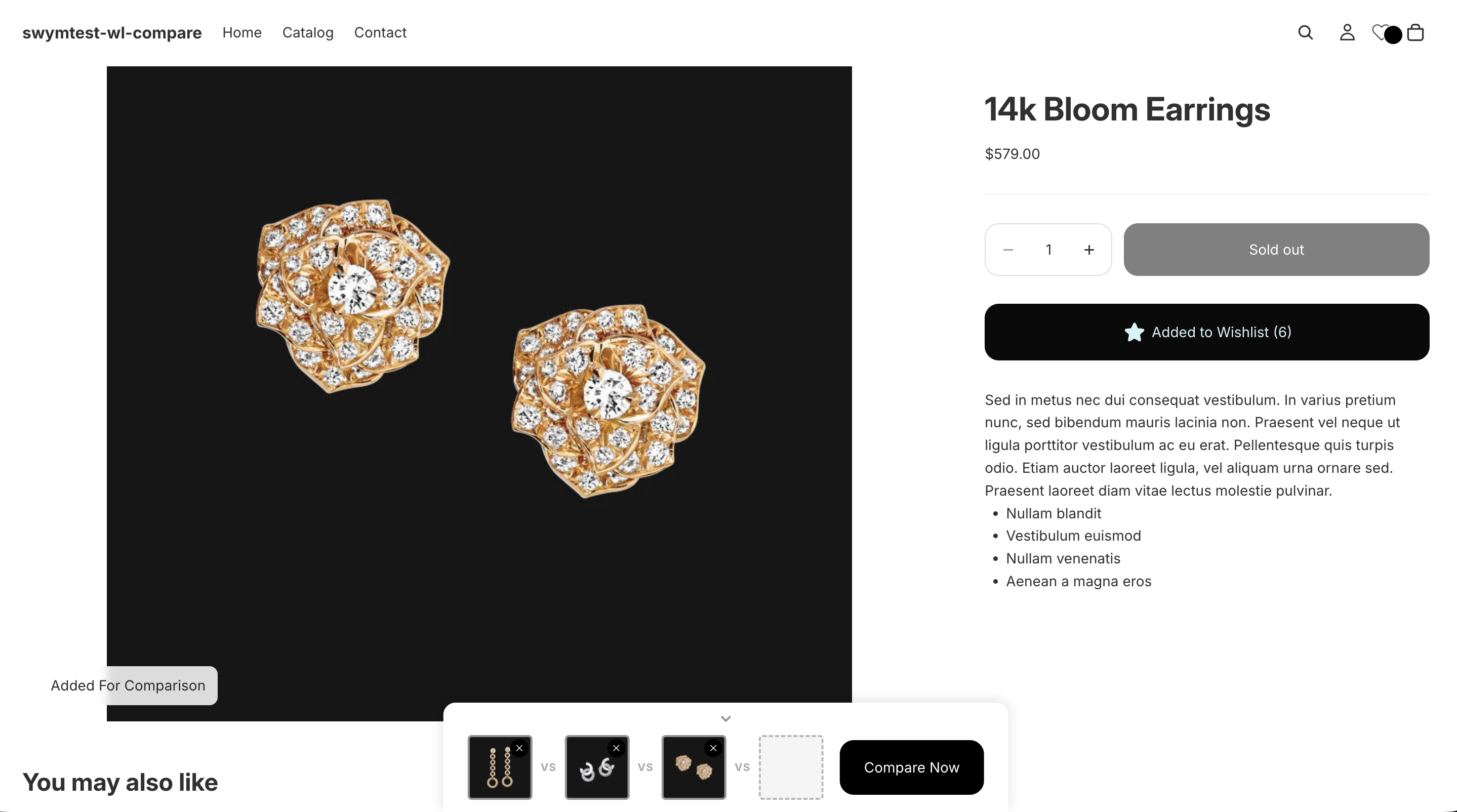
Comparison Bar, Custom Button
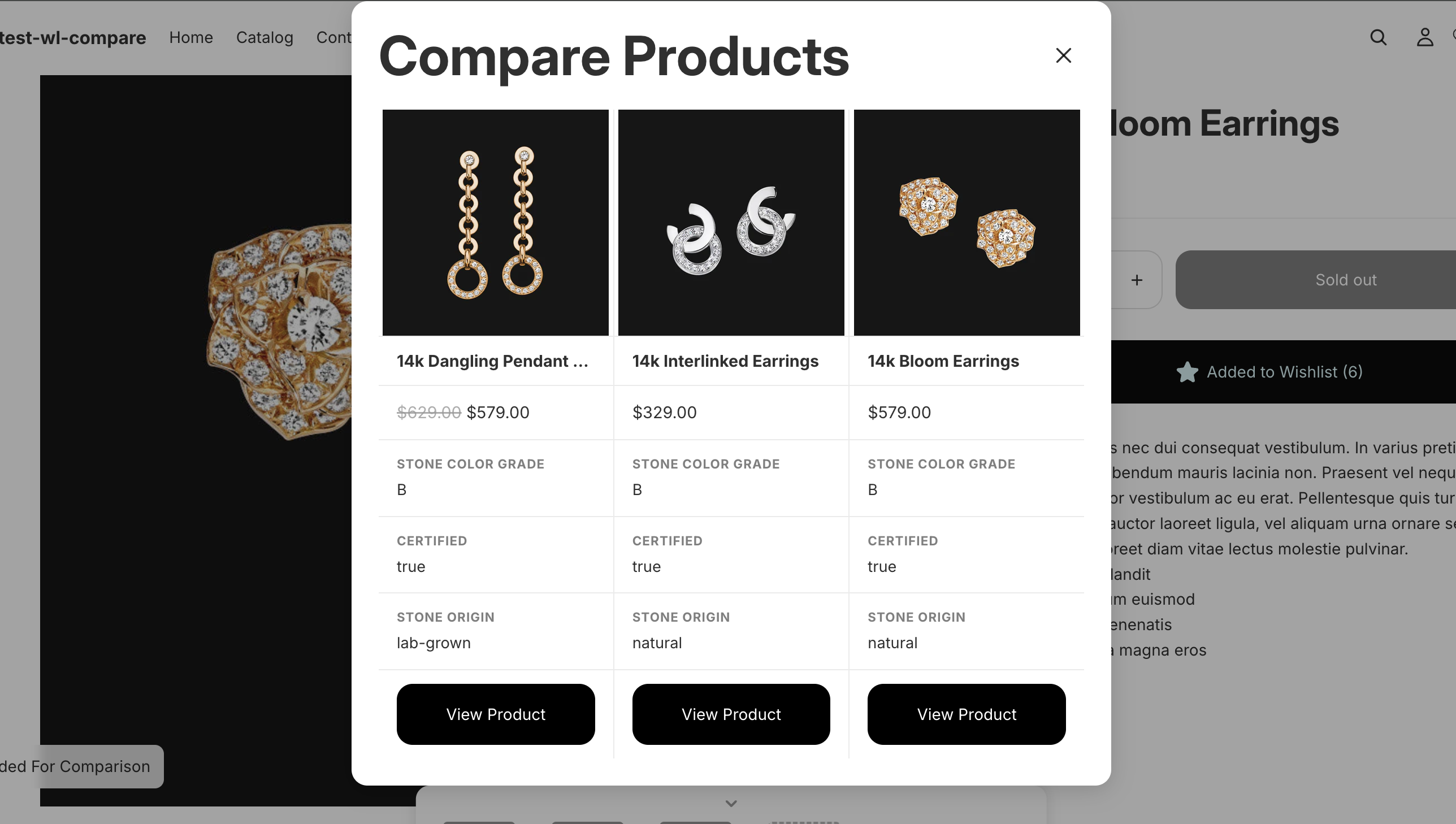
Comparison Modal
The Non-Obvious Parts
The Swym Wishlist API is designed for saving products a customer wants to buy later. This implementation repurposes it for an entirely different use case: a temporary comparison buffer. Understanding why that works (and what it buys you) is the core of this guide.
A named list as a comparison slot manager
On first load, the script calls swat.fetchLists() and scans for a list named "Comparison List". If none exists, it calls swat.createList() to provision one. After that, every add and remove is a standard addToList / deleteFromList call against that list.
This gives you cross-session persistence, per-customer isolation, and a ready-made CRUD layer without any additional investment. The Swym list IS the data store.
First page load
  swat.fetchLists()
    → finds existing "Comparison List"  → reuse its lid
    → no list found                     → swat.createList({ lname: "Comparison List" })
The du field as a Section Rendering API key
du field as a Section Rendering API keyEach item in a Swym list carries a du field: the canonical product URL on your store (e.g. /products/diamond-ring). Most integrations store du and never use it directly. Here it becomes the key to a Shopify Section Rendering API call:
GET {du}?section_id=swym-comparison-product-columnThis returns a fully server-rendered Liquid template with the product in scope: formatted prices, media, and metafields. No product JSON API call, no client-side price formatting, no separate metafield fetch. The du stored inside the Swym list item is all you need to get a complete, theme-accurate product column.
sessionStorage as an SDK mirror
The Swym SDK initializes asynchronously. The comparison bar is a global element that needs to render before the SDK fires. Rather than waiting, the button script mirrors the comparison list contents into sessionStorage (swym_comparison_products) on every add and remove. The bar reads sessionStorage on connectedCallback directly, so it renders immediately on page load with no flash of empty state. When the SDK does fire, it confirms or corrects the sessionStorage contents, then re-renders the bar.
A decoupled event architecture across two scripts
swym-comparison-button.js is loaded only on product pages (it contains the "Add To Compare" button logic and the Swym API calls). swym-comparison-module.js is loaded globally (it drives the bar and modal). These two scripts never share a module scope -- they communicate exclusively through DOM events:
| Dispatcher | Event | Listener | Trigger |
|---|---|---|---|
swym-comparison-button.js | swym:comparison-updated | swym-comparison-module.js | After any add, remove, or page-load state restore |
swym-comparison-module.js | swym:comparison-remove | swym-comparison-button.js | Bar slot × clicked when no matching <swym-comparison-button> element is in the DOM |
The swym:comparison-remove event is the subtler of the two. When a shopper clicks × in the bar on a collection page (where no <swym-comparison-button> elements exist), the bar needs to call deleteFromList. But swymInstance and comparisonListId live in swym-comparison-button.js. The bar dispatches swym:comparison-remove with the product identifiers; the button script's global event listener picks it up and performs the API call. API access is never duplicated, and neither script needs to know the other's internals.
The comparison list is visible to every fetchLists caller
fetchLists callerWatch out: This is the most common integration gotcha when running the comparison module alongside Swym's standard wishlist features. Read this section before going live.
Because the comparison list is a real Swym wishlist, it will appear in every swat.fetchLists() response across the entire storefront -- the wishlist page, the wishlist drawer, any popups or widgets that enumerate a customer's lists. If your theme or any Swym-powered UI renders all lists returned by fetchLists, the "Comparison List" will surface there as a wishlist the customer can interact with. Items added for comparison will appear as saved wishlist items, and the list itself may be renameable or deletable through the wishlist UI, which would silently break the comparison module on the next page load.
There are two complementary approaches to handle this. Use both if your store has both Swym's built-in wishlist widgets and custom list-rendering code.
Approach 1: CSS hiding for Swym's built-in wishlist UI
Swym's wishlist widgets render each list as a .swym-storefront-layout-collection-grid-item element with a data-lid attribute matching the list's ID. swym-comparison-button.js injects a <style> tag as soon as the comparison lid is resolved, hiding that element and its carousel container if the comparison list would be the only item left in it:
function injectComparisonHideStyle(lid) {
  let el = document.getElementById("swym-comparison-hide-style");
  if (!el) {
    el = document.createElement("style");
    el.id = "swym-comparison-hide-style";
    document.head.appendChild(el);
  }
  el.textContent =
    `.swym-storefront-layout-collection-grid-item[data-lid="${lid}"] { display: none !important; }\n` +
    `#swym-storefront-layout-collection-carousel-items-container:has(> .swym-storefront-layout-collection-grid-item[data-lid="${lid}"]:only-child) { display: none !important; }`;
}
The second rule uses :has(> child:only-child) to hide the parent carousel container when the comparison list is its sole remaining child, preventing an empty container shell from rendering. This function is called inside setComparisonListId() (slow path / first visit) and at the top of the onSwymLoadCallback fast path (returning visits), so the style is always present before Swym's own UI renders.
Note: You cannot put this selector in a static
{% stylesheet %}block. Liquid renders that block as literal CSS at build time -- the lid is not available then and the selector would never match anything. The style must be injected by JavaScript once the lid is known at runtime.
Approach 2: fetchLists filtering for custom wishlist UI
For any custom code that calls swat.fetchLists() and renders the results, window.comparisonListId is set by both setComparisonListId() and the fast path, making it available synchronously to any script that runs after them:
swat.fetchLists({
  callbackFn: function(lists) {
    const visibleLists = lists.filter((l) => l.lid !== window.comparisonListId);
    // render visibleLists only
  }
});
If a wishlist script runs before onSwymLoadCallback fires, window.comparisonListId will be undefined on the very first visit but will be populated from sessionStorage on every subsequent page load -- so the filter is reliable after the initial session.
Note: Both approaches require
swym-comparison-button.jsto be loaded on every page where wishlist UI appears, not just product pages. If the script is product-page-only, the style injection andwindow.comparisonListIdwill not be available on collection or home pages. In that case, filter by list name as a fallback:l.lname.toLowerCase() !== "comparison list".
Setup
Step 1: Prerequisites
Before adding any files, confirm all of the following are in place:
- The Swym Wishlist Plus app is installed and active, and its embed snippet is present in your theme layout
- Your theme uses OS 2.0 JSON templates
- You are using the Horizon theme (or are prepared to adapt the product card snippet and the
pricerender call to your own theme)
Step 2: Create the button script
Create assets/swym-comparison-button.js. This script is loaded only on product pages. It owns all Swym API calls, manages sessionStorage, and dispatches events.
//@ts-nocheck
const COMPARISON_LIST_NAME = "Comparison List";
const COMPARISON_LIST_SESSION_KEY = "swym_comparison_list_id";
const COMPARISON_PRODUCTS_SESSION_KEY = "swym_comparison_products";
const COMPARISON_MAX_PRODUCTS = 4;

let swymInstance = null;
let comparisonListId = sessionStorage.getItem(COMPARISON_LIST_SESSION_KEY);

function getComparisonProducts() {
  try {
    return JSON.parse(sessionStorage.getItem(COMPARISON_PRODUCTS_SESSION_KEY) || "[]");
  } catch {
    return [];
  }
}

function setComparisonProducts(products) {
  sessionStorage.setItem(COMPARISON_PRODUCTS_SESSION_KEY, JSON.stringify(products));
}

function dispatchComparisonUpdated(products) {
  document.dispatchEvent(
    new CustomEvent("swym:comparison-updated", { bubbles: false, detail: { products } })
  );
}

function setComparisonListId(lid) {
  comparisonListId = lid;
  sessionStorage.setItem(COMPARISON_LIST_SESSION_KEY, lid);
  window.comparisonListId = lid;
  document.querySelectorAll("swym-comparison-button").forEach((el) => {
    el.dataset.comparisonLid = lid;
  });
}

function isProductInList(epi) {
  return getComparisonProducts().some((p) => p.epi === epi);
}

function refreshButtonStates() {
  document.querySelectorAll("swym-comparison-button").forEach((el) => {
    const epi = parseInt(el.dataset.variantId, 10);
    if (!isNaN(epi) && isProductInList(epi)) {
      el.setAttribute("data-added", "true");
    } else {
      el.removeAttribute("data-added");
    }
  });
  document.querySelectorAll("swym-comparison-button").forEach((el) => {
    el.removeAttribute("disabled");
  });
}

class SwymComparisonButton extends HTMLElement {
  connectedCallback() {
    if (comparisonListId) {
      this.dataset.comparisonLid = comparisonListId;
    }

    const epi = parseInt(this.dataset.variantId, 10);
    if (!isNaN(epi) && isProductInList(epi)) {
      this.setAttribute("data-added", "true");
    }

    this._onClick = this._handleClick.bind(this);
    this.addEventListener("click", this._onClick);
  }

  disconnectedCallback() {
    if (this._onClick) {
      this.removeEventListener("click", this._onClick);
    }
  }

  _handleClick() {
    if (!swymInstance || !this.dataset.comparisonLid) return;

    const empi = parseInt(this.dataset.productId, 10);
    const epi = parseInt(this.dataset.variantId, 10);
    const du = this.dataset.productUrl;
    const product = { empi, epi, du };

    if (this.getAttribute("data-added") === "true") {
      swymInstance.deleteFromList(
        this.dataset.comparisonLid,
        product,
        () => {
          this.removeAttribute("data-added");
          const updated = getComparisonProducts().filter((p) => p.epi !== epi);
          setComparisonProducts(updated);
          dispatchComparisonUpdated(updated);
          refreshButtonStates();
        },
        (err) => console.error("[Swym] Failed to remove from Comparison List:", err)
      );
      return;
    }

    if (getComparisonProducts().length >= COMPARISON_MAX_PRODUCTS) {
      this.dataset.tooltip = `Max ${COMPARISON_MAX_PRODUCTS} products can be compared at once`;
      this.setAttribute("data-comparison-full", "");
      setTimeout(() => {
        this.removeAttribute("data-comparison-full");
        delete this.dataset.tooltip;
      }, 2500);
      return;
    }

    swymInstance.addToList(
      this.dataset.comparisonLid,
      product,
      () => {
        this.setAttribute("data-added", "true");
        setComparisonProducts([...getComparisonProducts(), product]);
        dispatchComparisonUpdated(getComparisonProducts());
      },
      (err) => console.error("[Swym] Failed to add to Comparison List:", err)
    );
  }
}

customElements.define("swym-comparison-button", SwymComparisonButton);

// Handles bar-initiated removes on pages where no <swym-comparison-button> is in the DOM.
// The bar dispatches this event rather than calling the API directly, keeping all Swym
// API calls in this one file regardless of which page the user is on.
document.addEventListener("swym:comparison-remove", (e) => {
  const { empi, epi, du } = e.detail;
  if (!swymInstance || !comparisonListId) return;
  swymInstance.deleteFromList(
    comparisonListId,
    { empi, epi, du },
    () => {
      const updated = getComparisonProducts().filter((p) => p.epi !== epi);
      setComparisonProducts(updated);
      dispatchComparisonUpdated(updated);
      refreshButtonStates();
    },
    (err) => console.error("[Swym] Bar-initiated remove failed:", err)
  );
});

function onSwymLoadCallback(swat) {
  swymInstance = swat;

  // null means the key was never written this session (distinct from "[]", an explicit empty list).
  // If null, fall through to fetchLists so the API can populate sessionStorage from server state.
  if (comparisonListId && sessionStorage.getItem(COMPARISON_PRODUCTS_SESSION_KEY) !== null) {
    window.comparisonListId = comparisonListId;
    document.querySelectorAll("swym-comparison-button").forEach((el) => {
      el.dataset.comparisonLid = comparisonListId;
    });
    refreshButtonStates();
    dispatchComparisonUpdated(getComparisonProducts());
    return;
  }

  // First visit or new session: find or create the Comparison List.
  swat.fetchLists({
    callbackFn: function (lists) {
      const existing = lists.find((l) => l.lname.toLowerCase() === COMPARISON_LIST_NAME.toLowerCase());
      if (existing) {
        setComparisonListId(existing.lid);
        setComparisonProducts(
          (existing.listcontents || []).map((item) => ({ empi: item.empi, epi: item.epi, du: item.du }))
        );
        refreshButtonStates();
        dispatchComparisonUpdated(getComparisonProducts());
        return;
      }
      swat.createList(
        { lname: COMPARISON_LIST_NAME },
        (newList) => {
          setComparisonListId(newList.lid);
          setComparisonProducts([]);
          dispatchComparisonUpdated([]);
        },
        (err) => console.error("[Swym] Failed to create Comparison List:", err)
      );
    },
    errorFn: (err) => console.error("[Swym] Failed to fetch lists:", err),
  });
}

if (!window.SwymCallbacks) {
  window.SwymCallbacks = [];
}
window.SwymCallbacks.push(onSwymLoadCallback);
Step 3: Create the comparison column section
Create sections/swym-comparison-product-column.liquid. This is a utility section never rendered as a visible page section -- it exists solely to be fetched via the Section Rendering API. Because it is rendered server-side, the full product object is available in scope, including metafields, formatted prices, and media.
Note: The 7 direct children of
.swym-comparison-colare a contract with the CSS subgrid. Adding or removing children without updating thegrid-row: span 7value in the stylesheet will break column alignment in the modal.
{% comment %}
  Only called via Section Rendering API:
    GET {product_url}?section_id=swym-comparison-product-column

  Renders one product's comparison column with full Liquid context (metafields, price, media).
  The wrapper div exposes data-thumbnail and data-title attributes so swym-comparison-module.js
  can build bar slot thumbnails without parsing the full column HTML.

  Direct children of .swym-comparison-col must stay at 7 to match the CSS subgrid row span:
    1. img-link
    2. title-cell
    3. price
    4. row -- stone_color_grade
    5. row -- certified
    6. row -- stone_origin
    7. cta
{% endcomment %}

{% liquid
  if product == blank
    assign product = closest.product
  endif
%}

<div
  class="swym-comparison-col"
  data-empi="{{ product.id }}"
  data-thumbnail="{{ product.featured_media.preview_image | image_url: width: 80, height: 80, crop: 'center' }}"
  data-title="{{ product.title | escape }}"
>
  <a href="{{ product.url }}" class="swym-comparison-col__img-link">
    <img
      src="{{ product.featured_media.preview_image | image_url: width: 400 }}"
      alt="{{ product.featured_media.preview_image.alt | default: product.title | escape }}"
      class="swym-comparison-col__img"
      loading="lazy"
      width="400"
    >
  </a>

  <div class="swym-comparison-col__title-cell">
    <h3 class="swym-comparison-col__title">{{ product.title }}</h3>
  </div>

  <div class="swym-comparison-col__price">
    {% render 'price', product_resource: product %}
  </div>

  <div class="swym-comparison-col__row">
    <span class="swym-comparison-col__label">Stone Color Grade</span>
    <span class="swym-comparison-col__value">{{ product.metafields.custom.stone_color_grade.value | default: '—' }}</span>
  </div>

  <div class="swym-comparison-col__row">
    <span class="swym-comparison-col__label">Certified</span>
    <span class="swym-comparison-col__value">{{ product.metafields.custom.certified.value | default: '—' }}</span>
  </div>

  <div class="swym-comparison-col__row">
    <span class="swym-comparison-col__label">Stone Origin</span>
    <span class="swym-comparison-col__value">{{ product.metafields.custom.stone_origin.value | default: '—' }}</span>
  </div>

  <div class="swym-comparison-col__cta-cell">
    <a href="{{ product.url }}" class="button swym-comparison-col__cta">View Product</a>
  </div>
</div>

{% schema %}
{
  "name": "Comparison Product Column",
  "disabled_on": { "groups": ["header", "footer"] },
  "settings": []
}
{% endschema %}
Step 4: Create the module script
Create assets/swym-comparison-module.js. This script is loaded globally. It owns the <swym-comparison-bar> custom element, the slot rendering, the modal open logic, and the in-memory HTML cache.
//@ts-nocheck
const COMPARISON_PRODUCTS_KEY = "swym_comparison_products";
const COMPARISON_LIST_KEY = "swym_comparison_list_id";
const MAX_SLOTS = 4;
// In-memory HTML cache -- fetched fresh on every page load, never persisted.
// Keyed by epi (variant ID) so two variants of the same product can each hold their own column.
const htmlCache = {};
function getProducts() {
try {
return JSON.parse(sessionStorage.getItem(COMPARISON_PRODUCTS_KEY) || "[]");
} catch {
return [];
}
}
function injectComparisonHideStyle(lid) {
if (!lid) return;
let el = document.getElementById("swym-comparison-hide-style");
if (!el) {
el = document.createElement("style");
el.id = "swym-comparison-hide-style";
document.head.appendChild(el);
}
el.textContent =
`.swym-storefront-layout-collection-grid-item[data-lid="${lid}"] { display: none !important; }\n` +
`#swym-storefront-layout-collection-carousel-items-container:has(> .swym-storefront-layout-collection-grid-item[data-lid="${lid}"]:only-child) { display: none !important; }`;
}
async function fetchColumnHtml(du) {
try {
const res = await fetch(du + "?section_id=swym-comparison-product-column");
return res.ok ? res.text() : null;
} catch {
return null;
}
}
class SwymComparisonBar extends HTMLElement {
#slotsEl = null;
#ctaEl = null;
#collapsed = false;
connectedCallback() {
this.#slotsEl = this.querySelector(".swym-comparison-bar__slots");
this.#ctaEl = document.getElementById("swym-comparison-open-modal");
this.#ctaEl?.addEventListener("click", this.#openModal);
document.addEventListener("swym:comparison-updated", this.#handleUpdate);
this.querySelector(".swym-comparison-bar__toggle")?.addEventListener("click", this.#toggleCollapse);
injectComparisonHideStyle(sessionStorage.getItem(COMPARISON_LIST_KEY));
// Render from sessionStorage before the Swym SDK fires, so the bar appears
// immediately on page load with no flash of empty state.
const existing = getProducts();
if (existing.length > 0) {
this.#fetchMissingHtml(existing).then(() => this.#render(existing));
}
}
disconnectedCallback() {
document.removeEventListener("swym:comparison-updated", this.#handleUpdate);
}
#toggleCollapse = () => {
this.#collapsed = !this.#collapsed;
if (this.#collapsed) {
this.setAttribute("collapsed", "");
} else {
this.removeAttribute("collapsed");
}
const toggleBtn = this.querySelector(".swym-comparison-bar__toggle");
if (toggleBtn) {
toggleBtn.setAttribute("aria-label", this.#collapsed ? "Expand comparison bar" : "Collapse comparison bar");
}
};
#handleUpdate = async (e) => {
injectComparisonHideStyle(window.comparisonListId);
const products = e.detail.products;
await this.#fetchMissingHtml(products);
this.#render(products);
};
async #fetchMissingHtml(products) {
const missing = products.filter((p) => p.du && !htmlCache[p.epi]);
if (missing.length === 0) return;
await Promise.all(
missing.map(async (p) => {
const html = await fetchColumnHtml(p.du);
if (html) htmlCache[p.epi] = html;
})
);
}
#render(products) {
if (!this.#slotsEl) return;
if (products.length < 2) {
this.setAttribute("hidden", "");
this.#collapsed = false;
this.removeAttribute("collapsed");
const toggleBtn = this.querySelector(".swym-comparison-bar__toggle");
if (toggleBtn) toggleBtn.setAttribute("aria-label", "Collapse comparison bar");
} else {
if (this.hasAttribute("hidden")) {
this.#collapsed = false;
this.removeAttribute("collapsed");
const toggleBtn = this.querySelector(".swym-comparison-bar__toggle");
if (toggleBtn) toggleBtn.setAttribute("aria-label", "Collapse comparison bar");
}
this.removeAttribute("hidden");
}
if (this.#ctaEl) this.#ctaEl.hidden = products.length < 2;
let html = "";
for (let i = 0; i < MAX_SLOTS; i++) {
if (i > 0) html += `<span class="swym-comparison-bar__vs" aria-hidden="true">vs</span>`;
const p = products[i];
if (p) {
const tmp = document.createElement("div");
tmp.innerHTML = htmlCache[p.epi] || "";
const col = tmp.querySelector(".swym-comparison-col");
const thumb = col?.dataset.thumbnail || "";
const title = col?.dataset.title || "";
html += `
<div class="swym-comparison-slot swym-comparison-slot--filled">
${thumb ? `<img class="swym-comparison-slot__img" src="${thumb}" alt="${title}" loading="lazy">` : ""}
<button
class="swym-comparison-slot__remove"
aria-label="Remove ${title} from comparison"
data-empi="${p.empi}"
data-epi="${p.epi}"
data-du="${p.du}"
>✕</button>
</div>`;
} else {
html += `<div class="swym-comparison-slot"></div>`;
}
}
this.#slotsEl.innerHTML = html;
this.#slotsEl.querySelectorAll(".swym-comparison-slot__remove").forEach((btn) => {
btn.addEventListener("click", () => {
const epi = parseInt(btn.dataset.epi, 10);
const empi = parseInt(btn.dataset.empi, 10);
const du = btn.dataset.du || "";
const onPage = document.querySelector(`swym-comparison-button[data-variant-id="${epi}"]`);
if (onPage) {
// Product page: trigger the button directly so it handles the API call.
onPage.click();
} else {
// Non-product page: dispatch to the swym:comparison-remove listener in
// swym-comparison-button.js, which holds the swymInstance reference.
document.dispatchEvent(
new CustomEvent("swym:comparison-remove", { bubbles: false, detail: { empi, epi, du } })
);
}
});
});
}
#openModal = async () => {
const products = getProducts();
const columnsEl = document.getElementById("swym-comparison-columns");
if (!columnsEl) return;
await this.#fetchMissingHtml(products);
columnsEl.style.setProperty("--swym-col-count", products.length);
columnsEl.innerHTML = products.map((p) => htmlCache[p.epi] || "").join("");
document.getElementById("swym-comparison-dialog-component")?.showDialog();
};
}
if (!customElements.get("swym-comparison-bar")) {
customElements.define("swym-comparison-bar", SwymComparisonBar);
}Step 5: Create the module snippet
Create snippets/swym-comparison-module.liquid. This snippet contains all HTML and CSS for the bar and the modal. It is rendered once, before </body>, on every page.
{% stylesheet %}
  /* Default UI elements hidden for compare module */
  swym-storefront-layout-notification,#swym-storefront-layout-total-list-items-count,
  #swym-storefront-layout-collection-carousel-title {
    display: none !important;
  }

  swym-comparison-bar {
    position: fixed;
    bottom: 0;
    left: 50%;
    width: fit-content;
    min-width: 300px;
    z-index: var(--layer-temporary);
    background-color: rgb(var(--color-background-rgb));
    box-shadow: 0 -2px 12px rgb(0 0 0 / 12%);
    border-radius: 12px 12px 0 0;
    transform: translateX(-50%) translateY(100%);
    transition: transform 300ms ease-out;
  }

  swym-comparison-bar:not([hidden]) {
    transform: translateX(-50%) translateY(0);
  }

  swym-comparison-bar[collapsed]:not([hidden]) {
    transform: translateX(-50%) translateY(calc(100% - 32px));
  }

  swym-comparison-bar[hidden] {
    display: block;
    visibility: hidden;
  }

  .swym-comparison-bar__toggle {
    display: flex;
    align-items: center;
    justify-content: center;
    width: 100%;
    height: 32px;
    background: none;
    border: none;
    cursor: pointer;
    padding: 0;
    color: rgb(var(--color-foreground-rgb) / 0.4);
  }

  .swym-comparison-bar__toggle svg {
    width: 16px;
    height: 16px;
    transition: transform 200ms ease;
  }

  swym-comparison-bar[collapsed] .swym-comparison-bar__toggle svg {
    transform: rotate(180deg);
  }

  .swym-comparison-bar__inner {
    display: flex;
    align-items: center;
    gap: 16px;
    padding: 0 24px 12px;
  }

  .swym-comparison-bar__slots {
    display: flex;
    align-items: center;
    gap: 8px;
  }

  .swym-comparison-bar__vs {
    font-size: 0.65rem;
    font-weight: 700;
    color: rgb(var(--color-foreground-rgb) / 0.35);
    text-transform: uppercase;
    letter-spacing: 0.06em;
    flex-shrink: 0;
  }

  .swym-comparison-slot {
    width: 64px;
    height: 64px;
    border: 2px dashed rgb(var(--color-foreground-rgb) / 0.25);
    border-radius: var(--style-border-radius-inputs);
    position: relative;
    overflow: hidden;
    flex-shrink: 0;
    background-color: rgb(var(--color-foreground-rgb) / 0.04);
  }

  .swym-comparison-slot--filled {
    border-style: solid;
    border-color: rgb(var(--color-foreground-rgb) / 0.4);
  }

  .swym-comparison-slot__img {
    width: 100%;
    height: 100%;
    object-fit: cover;
    display: block;
  }

  .swym-comparison-slot__remove {
    position: absolute;
    top: 2px;
    right: 2px;
    width: 18px;
    height: 18px;
    border-radius: 50%;
    background-color: rgb(var(--color-foreground-rgb));
    color: rgb(var(--color-background-rgb));
    font-size: 9px;
    line-height: 1;
    display: flex;
    align-items: center;
    justify-content: center;
    cursor: pointer;
    border: none;
    padding: 0;
  }

  .swym-comparison-bar__cta {
    white-space: nowrap;
    flex-shrink: 0;
  }

  @media screen and (max-width: 749px) {
    swym-comparison-bar {
      left: 0;
      width: 100%;
      border-radius: 0;
      transform: translateY(100%);
    }

    swym-comparison-bar:not([hidden]) {
      transform: translateY(0);
    }

    swym-comparison-bar[collapsed]:not([hidden]) {
      transform: translateY(calc(100% - 32px));
    }

    .swym-comparison-bar__inner {
      padding: 0 12px 10px;
      gap: 10px;
    }

    .swym-comparison-bar__slots {
      gap: 4px;
      flex: 1;
    }

    .swym-comparison-bar__vs {
      display: none;
    }

    .swym-comparison-slot {
      width: 44px;
      height: 44px;
      flex: 1;
      max-width: 44px;
    }
  }

  .swym-comparison-modal {
    width: min(96vw, 960px);
    max-height: 90dvh;
    padding: 24px;
    overflow-y: auto;
    border-radius: var(--style-border-radius-popover);
  }

  .swym-comparison-modal__header {
    display: flex;
    align-items: center;
    justify-content: space-between;
    margin-bottom: 24px;
  }

  .swym-comparison-modal__title {
    margin: 0;
  }

  .swym-comparison-modal__close {
    display: flex;
    align-items: center;
    justify-content: center;
    width: 36px;
    height: 36px;
    cursor: pointer;
    flex-shrink: 0;
  }

  .swym-comparison-modal__close svg {
    width: 16px;
    height: 16px;
  }

  .swym-comparison-modal__columns {
    display: grid;
    grid-template-columns: repeat(var(--swym-col-count, 1), 1fr);
    column-gap: 1px;
    background-color: rgb(var(--color-foreground-rgb) / 0.08);
    overflow-x: auto;
    scroll-snap-type: x mandatory;
  }

  @media screen and (min-width: 750px) {
    .swym-comparison-modal__columns {
      overflow-x: visible;
    }
  }

  /* 7 rows matching the 7 direct children in swym-comparison-product-column.liquid */
  .swym-comparison-col {
    display: grid;
    grid-row: span 7;
    grid-template-rows: subgrid;
    min-width: 180px;
    scroll-snap-align: start;
    background-color: rgb(var(--color-background-rgb));
  }

  @media screen and (min-width: 750px) {
    .swym-comparison-col {
      min-width: 0;
    }
  }

  /* All cells get uniform padding and a bottom border for table rows */
  .swym-comparison-col > * {
    padding: 12px 16px;
    border-bottom: 1px solid rgb(var(--color-foreground-rgb) / 0.08);
  }

  .swym-comparison-col__img-link {
    display: block;
    padding: 0;
  }

  .swym-comparison-col__img {
    width: 100%;
    height: 200px;
    object-fit: contain;
    display: block;
  }

  .swym-comparison-col__title-cell {
    display: flex;
    align-items: center;
  }

  .swym-comparison-col__title {
    font-size: 0.9rem;
    margin: 0;
    line-height: 1.3;
    display: -webkit-box;
    -webkit-line-clamp: 3;
    -webkit-box-orient: vertical;
    overflow: hidden;
  }

  .swym-comparison-col__price {
    font-size: 0.9rem;
    display: flex;
    align-items: center;
  }

  .swym-comparison-col__row {
    display: flex;
    flex-direction: column;
    justify-content: center;
    gap: 3px;
    font-size: 0.85rem;
  }

  .swym-comparison-col__label {
    font-weight: 600;
    font-size: 0.7rem;
    text-transform: uppercase;
    letter-spacing: 0.05em;
    color: rgb(var(--color-foreground-rgb) / 0.5);
  }

  .swym-comparison-col__cta-cell {
    display: flex;
    align-items: center;
    border-bottom: none;
  }

  .swym-comparison-col__cta {
    width: 100%;
    text-align: center;
  }

  swym-comparison-button[data-comparison-full] {
    position: relative;
  }

  swym-comparison-button[data-comparison-full]::after {
    content: attr(data-tooltip);
    position: absolute;
    bottom: calc(100% + 8px);
    left: 50%;
    transform: translateX(-50%);
    background-color: rgb(var(--color-foreground-rgb));
    color: rgb(var(--color-background-rgb));
    padding: 6px 10px;
    border-radius: 4px;
    font-size: 0.75rem;
    white-space: nowrap;
    pointer-events: none;
    z-index: var(--layer-temporary);
    animation: swym-tooltip-in 150ms ease;
  }

  @keyframes swym-tooltip-in {
    from { opacity: 0; transform: translateX(-50%) translateY(4px); }
    to   { opacity: 1; transform: translateX(-50%) translateY(0); }
  }

  .swym-comparison-col__title-cell {
  min-width: 0;
}

.swym-comparison-col__title {
  display: block;
  min-width: 0;
  white-space: nowrap;
  overflow: hidden;
  text-overflow: ellipsis;
}
{% endstylesheet %}

<swym-comparison-bar id="swym-comparison-bar" hidden>
  <button
    class="swym-comparison-bar__toggle"
    id="swym-comparison-toggle"
    type="button"
    aria-label="Collapse comparison bar"
  >
    <svg viewBox="0 0 16 16" fill="none" stroke="currentColor" stroke-width="2" stroke-linecap="round" stroke-linejoin="round" aria-hidden="true">
      <polyline points="4 6 8 10 12 6"></polyline>
    </svg>
  </button>
  <div class="swym-comparison-bar__inner">
    <div class="swym-comparison-bar__slots"></div>
    <button
      class="button swym-comparison-bar__cta"
      id="swym-comparison-open-modal"
      type="button"
    >
      Compare Now
    </button>
  </div>
</swym-comparison-bar>

<dialog-component id="swym-comparison-dialog-component">
  <dialog
    ref="dialog"
    class="dialog-modal swym-comparison-modal"
    scroll-lock
    aria-labelledby="swym-comparison-modal-heading"
  >
    <div class="swym-comparison-modal__header">
      <h2 id="swym-comparison-modal-heading" class="swym-comparison-modal__title">
        Compare Products
      </h2>
      <button
        type="button"
        class="button button-unstyled swym-comparison-modal__close"
        aria-label="Close comparison"
        on:click="dialog-component/closeDialog"
      >
        {{- 'icon-close.svg' | inline_asset_content -}}
      </button>
    </div>
    <div class="swym-comparison-modal__columns" id="swym-comparison-columns"></div>
  </dialog>
</dialog-component>
Step 6: Add the "Add To Compare" button snippet
Create snippets/swym-comparison-button.liquid. This snippet renders the per-product button that shoppers click to add or remove a product from the comparison list.
<swym-comparison-button
  data-product-id="{{ product.id }}"
  data-variant-id="{{ product.selected_or_first_available_variant.id }}"
  data-product-url="{{ shop.url }}{{ product.url }}"
>
  <span data-label-add>Add to Compare</span>
  <span data-label-remove>Remove</span>
</swym-comparison-button>
Step 7: Render the button on the product page
In snippets/product-media-gallery-content.liquid (or whichever snippet renders the product media gallery on your theme), wrap the media gallery in a position: relative container and render the comparison button overlaid on the product image:
<div style="position: relative;">
  {%- comment -%} existing media gallery markup {%- endcomment -%}
  {% render 'swym-comparison-button', product: product %}
</div>
Style swym-comparison-button to position it as an overlay using position: absolute within that container.
Step 8: Load the scripts
In snippets/scripts.liquid, add the following. The button script is guarded to product pages only; the module script is global.
{% if template.name == 'product' %}
  <script src="{{ 'swym-comparison-button.js' | asset_url }}" defer="defer"></script>
{% endif %}

<script src="{{ 'swym-comparison-module.js' | asset_url }}" defer="defer"></script>
Step 9: Render the module snippet globally
In layout/theme.liquid, render the snippet before </body>:
{% render 'swym-comparison-module' %}How It Works
Add a product
- Shopper clicks "Add To Compare" on a product page.
SwymComparisonButton._handleClickcallsswymInstance.addToList(comparisonListId, product, ...).- On success:
setComparisonProducts([...existing, { empi, epi, du }])writes the updated list to sessionStorage.dispatchComparisonUpdated(products)fires ondocument. SwymComparisonBar.#handleUpdatereceives the event. It calls#fetchMissingHtml(products), which checks the in-memoryhtmlCachefor any products without cached HTML and fires parallel Section Rendering API requests for those missing entries:GET {du}?section_id=swym-comparison-product-column.- Shopify renders the section server-side with the full
productobject in scope. The HTML response includes metafields, formatted prices, and media. The result is stored inhtmlCache[epi]. #render(products)builds the bar slot HTML. It extracts the thumbnail and title fromhtmlCache[epi]by parsing thedata-thumbnailanddata-titleattributes on.swym-comparison-col. The bar slides into view.- The "Compare Now" button is hidden until at least two products are queued (
products.length < 2).
If the list is already full (products.length >= COMPARISON_MAX_PRODUCTS): the click is blocked before any API call is made. The button receives data-comparison-full and data-tooltip (set to the localised limit message, e.g. "Max 4 products can be compared at once"). CSS reads the tooltip text via content: attr(data-tooltip) on a ::after pseudo-element, animates it in above the button, and both attributes are removed after 2.5 seconds. Because the message is built from COMPARISON_MAX_PRODUCTS at runtime, changing the constant automatically updates the tooltip copy.
Page load (returning visit)
SwymComparisonBar.connectedCallbackfires. It readssessionStoragedirectly and calls#fetchMissingHtmlfollowed by#render-- before the Swym SDK has initialized. The bar renders immediately.- When the SDK fires
SwymCallbacks,onSwymLoadCallbackruns. BecausecomparisonListIdandswym_comparison_productsare already in sessionStorage, it skipsfetchListsentirely, callsrefreshButtonStatesto mark the correct buttons as added, and dispatchesswym:comparison-updatedto re-render the bar from the confirmed list state.
Open the modal
- Shopper clicks "Compare Now".
#openModalcalls#fetchMissingHtmlone more time (a no-op if all products are already cached), then setscolumnsEl.innerHTMLto the joined HTML strings fromhtmlCache.- The modal opens with fully rendered columns. No async work happens at open time if the bar has already fetched everything.
Remove from the bar
- Shopper clicks × on a bar slot.
#render's click handler checks whether a<swym-comparison-button data-variant-id="{epi}">exists in the current DOM.- Product page: Found -- calls
.click()on it. The button's own click handler callsdeleteFromListand updates sessionStorage. - Any other page: Not found -- dispatches
swym:comparison-removewith{ empi, epi, du }. The global listener inswym-comparison-button.jspicks it up and callsdeleteFromList. This listener is registered unconditionally at the module scope of that file, so it is active even when no button elements are present in the DOM.
- Product page: Found -- calls
sessionStorage Keys
| Key | Value |
|---|---|
swym_comparison_list_id | The Swym list ID string for the "Comparison List" |
swym_comparison_products | [{ empi, epi, du }] -- up to 4 products |
Column HTML is not persisted to sessionStorage. It is fetched fresh from the Section Rendering API on every page load and stored in the module-level htmlCache object for the lifetime of that page visit. This ensures metafield data, prices, and media are always current and eliminates stale cache bugs across deploys.
Adding or Changing Comparison Fields
All comparison field configuration lives in sections/swym-comparison-product-column.liquid. Because this section is rendered server-side, you have the full Liquid product object available including all metafields.
To add a metafield row:
- Add a new
<div class="swym-comparison-col__row">child to.swym-comparison-col. - Update the subgrid row span. In
snippets/swym-comparison-module.liquid, changegrid-row: span 7to match the new total child count. Update the comment that documents the children.
<div class="swym-comparison-col__row">
  <span class="swym-comparison-col__label">Cut Grade</span>
  <span class="swym-comparison-col__value">{{ product.metafields.custom.cut_grade.value | default: '—' }}</span>
</div>
Important: Always use
.valuewhen outputting a metafield. Without it, Liquid renders the metafield object itself (which outputs nothing), and| default: '—'never triggers because the object is truthy even when the metafield has no value. Metafields must also have storefront access enabled in your Shopify admin under Settings > Custom data for the values to be readable in Liquid.
To always show a row even when the metafield is empty, render the row unconditionally and rely on | default: '—'. This keeps the subgrid row count consistent across all product columns. If one product has the metafield and another does not, the rows still align because both columns have the same number of children.
CSS Subgrid Alignment
The modal uses CSS subgrid to align field rows horizontally across all product columns, so "Stone Color Grade" on product A occupies the same row height as "Stone Color Grade" on product B regardless of content length.
The parent __columns grid defines the column layout. Each .swym-comparison-col sets grid-row: span 7; grid-template-rows: subgrid, which participates in the parent grid's implicit row track sizing rather than defining its own. Every column's children share the same row definitions, so the tallest cell in any column sets the height for that row across all columns.
This breaks if any column has a different number of direct children than the span value. Both the span and the Liquid section must be kept in sync.
Styling
The module snippet ships with structural styles only. Adjust the following classes to match your theme:
| Class / Element | Purpose |
|---|---|
swym-comparison-bar | The fixed bottom container. On desktop: centered with left: 50% and translateX(-50%), width: fit-content. On mobile (max-width: 749px): full-width, left: 0, border-radius: 0, transforms drop the translateX component entirely. |
.swym-comparison-bar__toggle | The 32px chevron button at the top of the bar. Chevron rotates 180deg when [collapsed] is set. |
.swym-comparison-bar__inner | Flex row containing the slots and the CTA button. |
.swym-comparison-slot | 64x64 slot on desktop. Reduced to 44x44 with flex: 1 on mobile so the four slots distribute evenly across the full-width bar. Dashed border when empty, solid when filled. |
.swym-comparison-bar__vs | Hidden on mobile (display: none) to recover horizontal space. Visible on desktop as a small uppercase label between slots. |
.swym-comparison-slot__remove | Absolute-positioned × button overlaid on each filled slot. |
.swym-comparison-bar__vs | Small "vs" label between slots. |
.swym-comparison-modal | The <dialog> element. width: min(96vw, 960px) constrains it on wide screens. |
.swym-comparison-modal__columns | CSS grid that holds all product columns. --swym-col-count is set by JS to match the product count. |
.swym-comparison-col | One product column. Uses subgrid to align rows across columns. |
.swym-comparison-col__row | A metafield or data row. Flex column with label above value. |
.swym-comparison-col__cta-cell | The "View Product" CTA row at the bottom of each column. border-bottom: none so the last row has no separator. |
Troubleshooting
The bar does not appear after adding products
Check that swym-comparison-module.liquid is rendered in layout/theme.liquid and that swym-comparison-module.js loads on every page (not guarded by a template check in scripts.liquid). The bar hides itself when fewer than two products are queued, so it will not appear after the first add -- this is intentional.
The bar appears but slots show no thumbnails
The Section Rendering API fetch for that product's column HTML may have failed. Open the Network tab in DevTools and look for requests to {product_url}?section_id=swym-comparison-product-column. A 404 means the section file is missing or named incorrectly. A 200 with empty body usually means the section rendered with product == blank -- verify that the closest.product fallback in the section's Liquid header resolves correctly for your theme version.
Metafield values show as blank or never fall back to "—"
You are missing .value. Use product.metafields.custom.your_key.value, not product.metafields.custom.your_key. Also verify the metafield has storefront access enabled in Shopify Admin > Settings > Custom data > [namespace] > [metafield] > Storefront access.
Modal columns are misaligned (rows at different heights across columns)
The number of direct children in .swym-comparison-col does not match grid-row: span N in the stylesheet. Count the direct children in swym-comparison-product-column.liquid and update the span value to match.
Removing a product from the bar on a non-product page does nothing
The swym:comparison-remove event listener lives in swym-comparison-button.js. Verify that script is loading on all pages, not just product pages. Check snippets/scripts.liquid -- the module script should be outside any {% if template.name == 'product' %} guard.
The comparison list keeps growing instead of resetting
Each add calls swymInstance.addToList and each remove calls swymInstance.deleteFromList against the same named list. If you see duplicates or stale items, check that deleteFromList is receiving the correct epi (variant ID, not product ID) and that the product object passed to it matches what was passed to addToList.
Clicking × on the bar triggers the wrong product removal
data-epi on the remove button must be the variant ID. Verify that p.epi in the sessionStorage products array is the variant ID and not the product ID (empi). The Swym list item stores both: empi is the product ID, epi is the variant ID.